
What is the Marketo MCP?
The Marketo MCP (Model Context Protocol) is an Adobe-hosted server that connects an AI assistant like Claude directly to Marketo Engage. It exposes more than 100 Marketo Engage operations across forms, programs, smart campaigns, leads, emails, snippets, lists, and folders, so you can query data, audit programs, and build campaigns in plain language, while people stay in control of strategy and approvals and the assistant handles the manual work.
Marketing teams are adopting AI in Marketo Engage at very different speeds. Some are asking an assistant simple questions about their database. Others are building entire programs from a single brief. The Adobe Marketo MCP server is what makes that range possible. For most teams, the practical question is not whether to adopt it, but which rung of the ladder they are on today, and how to climb to the next one safely.
This guide gives you a maturity model for adopting the Marketo MCP: crawl, walk, run, fly. You get a concrete example at each stage, the governance that keeps people in control, and a first step you can take this week.
This guide distills our joint webinar with Adobe on the Marketo MCP. Watch the full conversation:
What an MCP is and how it works
MCP stands for Model Context Protocol, an open standard introduced by Anthropic for connecting AI tools to the systems where data lives.
Three terms travel together here and are easy to confuse. A useful analogy from the allGood team is a kitchen:
- The MCP is the ingredients. Access to what Marketo Engage can do: the data, the operations, the actions.
- A skill is the recipe. A reusable set of instructions that tells the assistant how to perform a specific task the same way every time.
- An agent is the chef. It follows the recipe, makes judgment calls within your rules, and produces the result.
The distinction matters because access alone is not the finished result. Connecting an assistant to Marketo Engage is the starting point; the skills that encode how the work should be done (and the human oversight around them) are what turn that connection into reliable output.
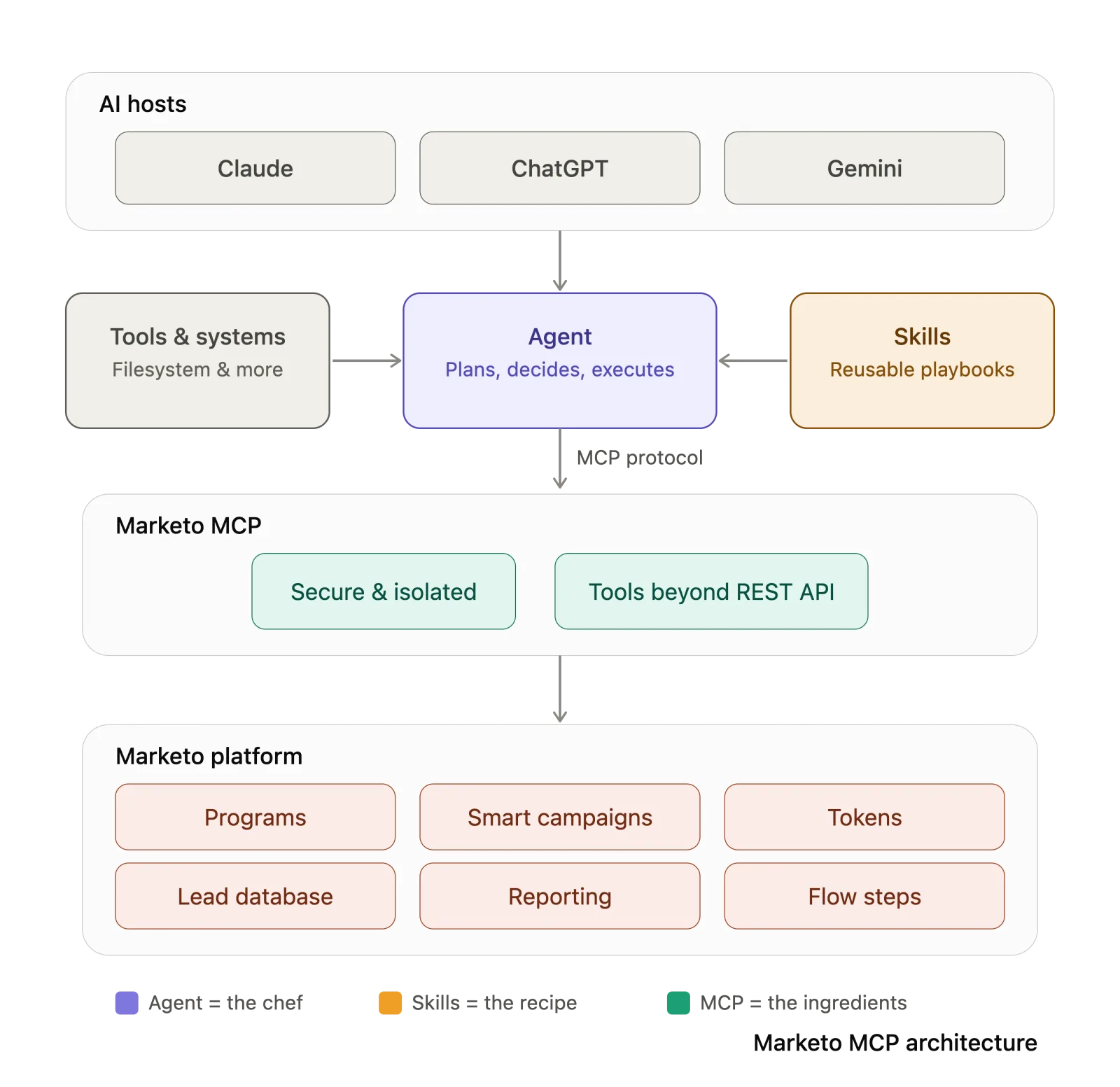
How the Marketo MCP differs from Marketo AI
It is easy to mix up the Marketo MCP with Marketo AI, and the difference shapes how you adopt each one.
Marketo AI, also called Build with AI, is a set of purpose-built agents inside Marketo Engage, for tasks such as validating programs, importing leads, and answering product questions. You use it from inside the platform, and it is designed for teams that want AI assistance without connecting their own tools.
The Marketo MCP connects your own AI assistant to Marketo Engage from outside the platform, so you can build custom skills and orchestrate work across other systems, such as a document store or a project tracker.
The two are complementary stages on the same roadmap, not competitors. One practical difference today: because the MCP runs inside your own AI tool, your conversation history stays there. Some early users have noted that the in-platform Marketo AI does not retain conversation history once a session closes. Many mature teams will use both: Marketo AI for guided, in-platform tasks, and the Marketo MCP for custom, cross-system workflows.
Sources: the Marketo Engage MCP server and Marketo AI overview documentation.
Why it matters: more work done, by more people, in less time
The value of the Marketo MCP is not that it does things Marketo Engage could never do. It is that it collapses the manual labor those tasks require, and widens who can do them.
Consider the work that fills an operations team's week. Answering "why didn't this lead become an MQL?" once meant combing the activity log for the better part of an hour. Checking database health meant hunting across reports. Building a program meant clicking in dozens of tokens by hand. With the Marketo MCP, each of those becomes a request you make in plain language and get back in seconds or minutes.
The result is twofold. Operations teams reclaim hours of repetitive work and redirect them to strategy. And people who do not have (or should not have) direct Marketo Engage access can still get campaign work done, because they interact through an assistant rather than the platform itself. You gain faster execution and broader access, with the same controls in place.
The time difference is concrete. allGood reports that a full Marketo program that takes a specialist 4 to 8 hours to build by hand can be assembled by an AI agent in about 15 minutes, ready for a person to review and launch.
AI adoption model: crawl, walk, run, fly
Teams adopt the Marketo MCP in stages. A practical way to map your own progress (and plan the next step) is a four-stage model: crawl, walk, run, fly. Each stage adds capability, and each one keeps people in control of the decisions that matter.
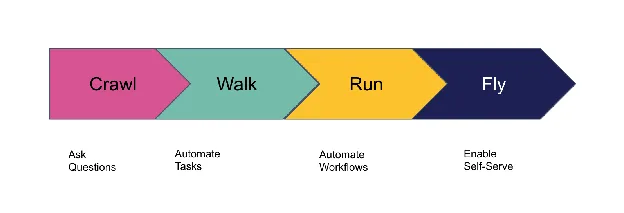
Crawl: chat with the MCP
With the Marketo MCP connected to your assistant, you can ask questions and audit your work in plain language. Nothing changes in Marketo Engage, so this stage carries no write risk, and it is the fastest way to see the value.
Prerequisites:
- The Marketo MCP connected to an AI assistant (for example, Claude)
Use cases:
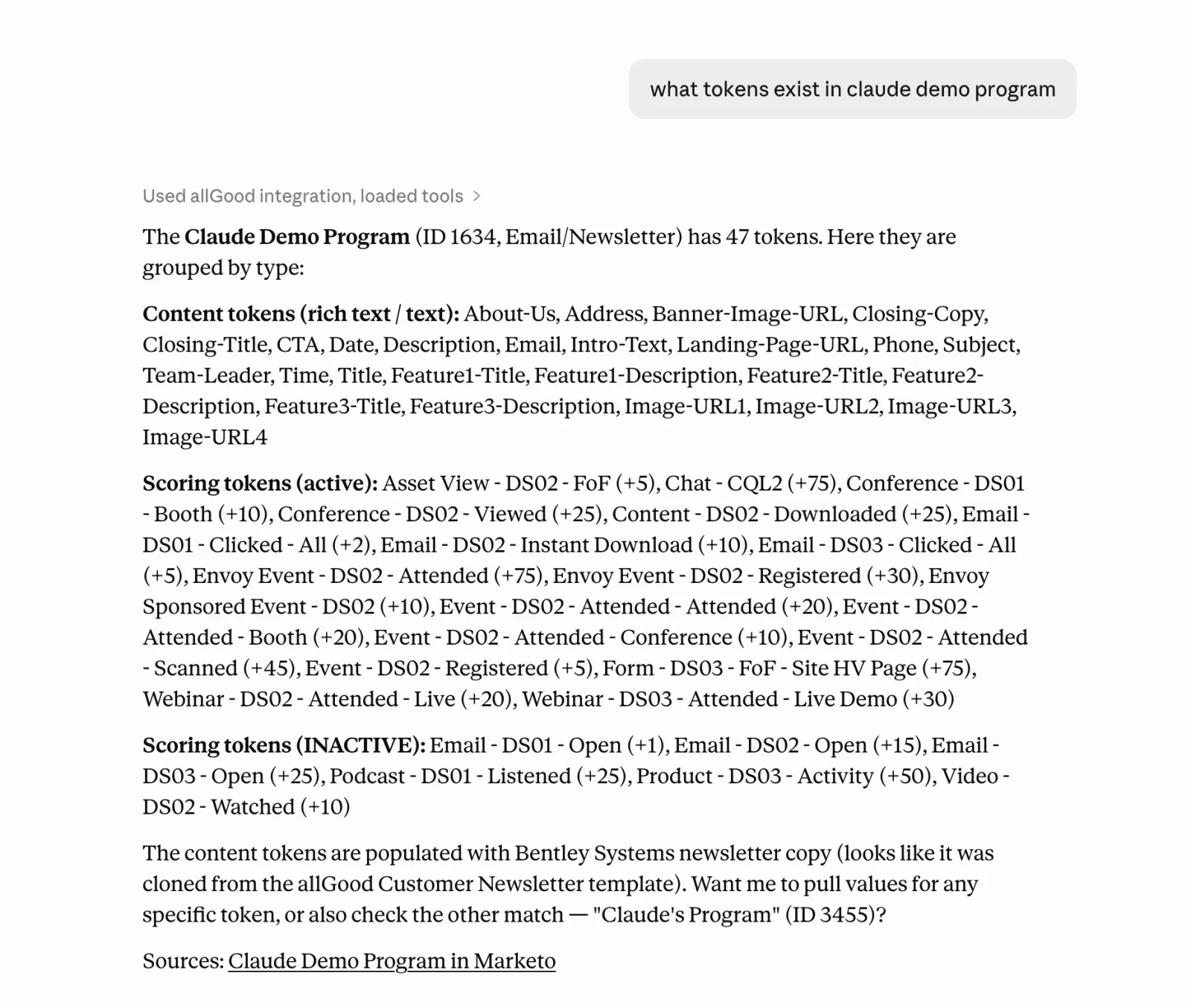
- Want to understand the details of a Marketo program without logging in.
- Diagnose an MQL gap. Ask why a specific lead did not become an MQL and have the assistant trace the activity log for the answer, work that once took the better part of an hour.
- Audit before launch. Have the assistant review a program and surface a flow step pointed at the wrong channel, a missing token, or a missing UTM parameter, before anything goes live.
- Take a full inventory. Run a few prompts to pull a complete campaign inventory with no skill required, or list every nurture that ran last quarter.
- Check database health. Find duplicate, malformed, or stale records across your database.
- Inspect a lead or a smart campaign. Look up a lead by email and review their activity history, or read a smart campaign's smart list filters and flow steps.
Walk: automate a recurring task with a skill
When you notice you ask the assistant the same thing every week, turn it into a skill so the work runs the same way every time. You review the output on each run, so write risk stays low.
Prerequisites:
- The Marketo MCP connected to an AI assistant (for example, Claude)
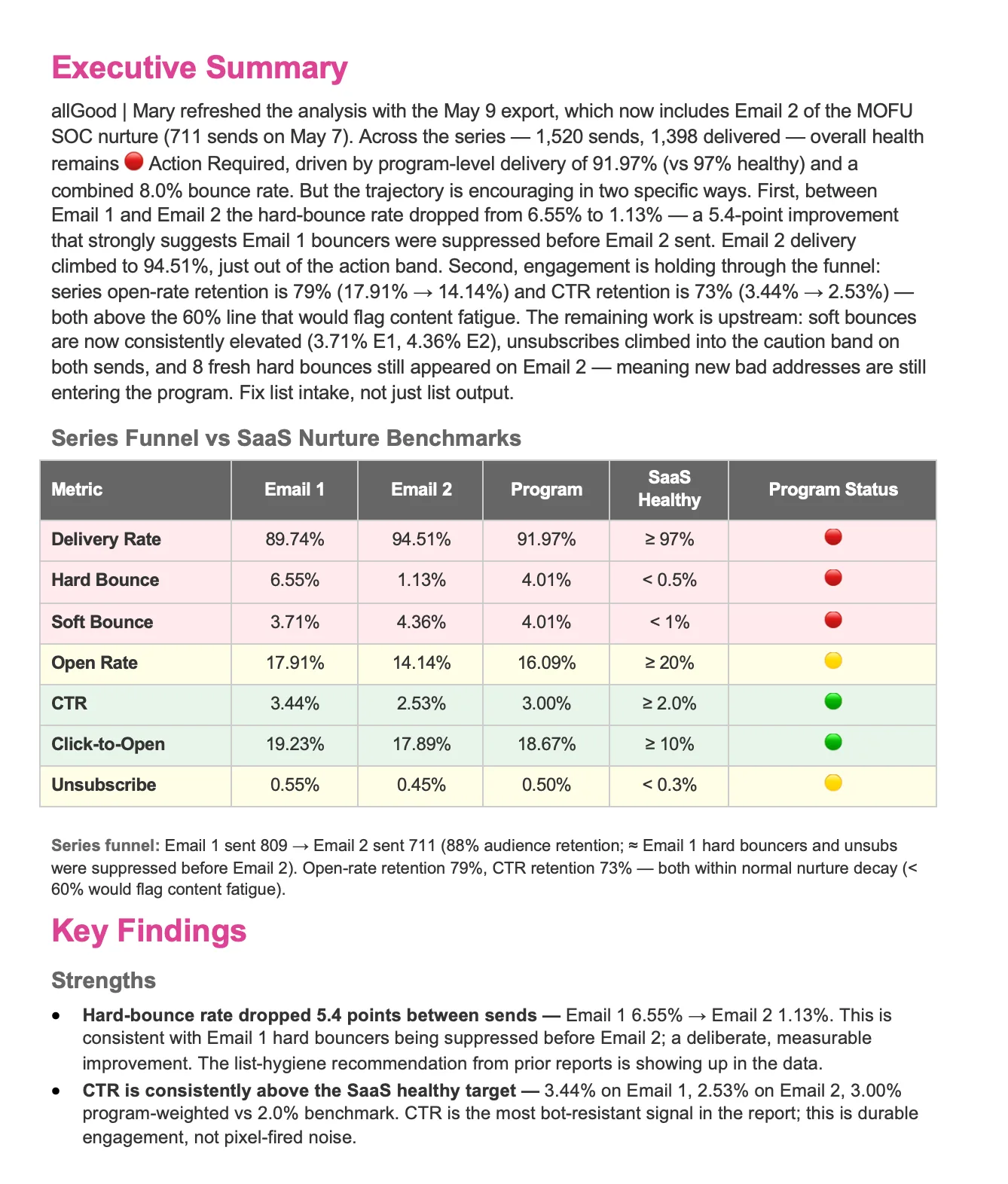
- A skill for the task (for example, allGood's free Email Performance Analyzer)
Use cases:
- Want to run an analysis on your latest Marketo email campaign.
- Benchmark email performance. Upload an email report and get delivery and bounce rates, trends, and a 90-day action plan in minutes, instead of an hour of manual work.
- Document a program automatically. Read a program, map every campaign and token, and flag broken parts, the same way every time.
- Build campaign briefs from a template. Stop rebuilding the same document for every launch and generate a structured brief on demand.
- Run a standardized QA pass. Validate tokens, links, and naming against your conventions before a program ships.
- Schedule a recurring health report. Produce a database-health or data-quality summary for your team on a regular cadence.
Run: build a program end to end
Hand the assistant a structured brief and it builds the program end to end, coordinating across Marketo Engage, your document store, and its own writing, with you approving each step.
Prerequisites:
- The Marketo MCP connected to an AI assistant (for example, Claude)
- Skills for the build (for example, a Marketo tokens skill and a briefing-doc builder)
Use cases:
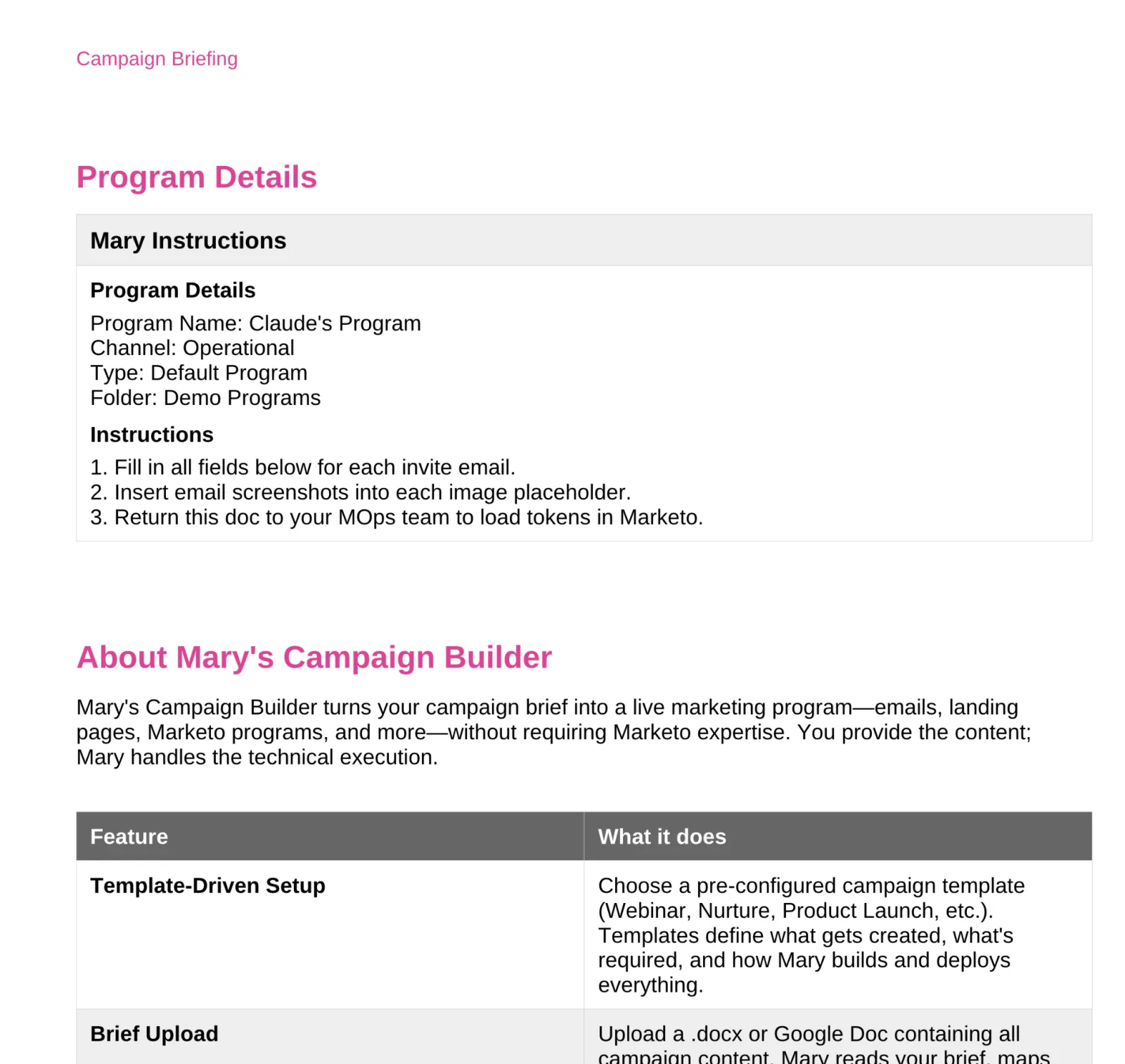
- Want to build a campaign, from creating the program template to updating tokens.
- Turn a brief into a program. Hand over a briefing document and have the assistant create the program from a template, generate and populate the tokens, and draft the emails.
- Author smart lists and smart campaigns from scratch. Build smart list rules and flow steps the public REST API never exposed, so an agent can compose a complete flow rather than copy a template.
- Clone and adapt for a new audience. Clone an existing program into a new folder and adjust it for a region, segment, or language, for example cloning a Q4 webinar program into your 2026 events folder.
- Stand up a nurture or webinar program. Build the assets, tokens, and flow for a multi-step program from a content outline.
- Expand an audience without an admin. Add a new segment to a nurture, for example EMEA enterprise accounts, by editing the smart list directly.
Fly: enable self-serve without platform access
At the most advanced stage, built for enterprises and teams, people who never log in to Marketo Engage can self-serve safely. A teammate submits a brief through a tool like Asana, an AI agent builds the campaign, and operations keeps full visibility through an audit log and guardrails. Governance stays in your hands: you decide which tools and operations the agent can use. This is how allGood's AI teammate, allGood, operates: it builds programs natively through the Marketo Engage MCP.
Prerequisites:
- The Marketo MCP
- AllGood’s allGood
- A project tracker (for example, Asana)
Use cases:
- Want to allow teams to self-serve via Asana.
- Self-serve from a project tracker. Let a teammate without Marketo Engage access submit a brief as an Asana task, then have the agent build the campaign, preview the content, flag anything missing, and log every change.
- Unblock demand gen and field teams. Give regional and demand gen teams a self-serve path, so requests that used to sit in a queue get built without an admin in the loop.
- Govern what the agent can do. Limit which tools and operations the agent can use, and require review through the audit log.
- Build from a one-paragraph brief. Produce a complete program that respects your templates, tokens, and folder structure, ready for review in about 15 minutes rather than the 4 to 8 hours a specialist would take.
- Scale a lean team. Hand routine execution to a managed agent: Sysdig recovered $910K in pipeline in its first 30 days with allGood.
The stages are cumulative. Most teams start at crawl, prove the value, and climb as their confidence and governance mature.
Adopting safely: keeping people in control
The Marketo MCP introduces a new surface to govern, and the controls are layered: some Adobe's responsibility, some yours.
Adobe secures the server itself. In this joint webinar, Niranjan Kumbi (Director of Product, Adobe) described network-level isolation, tenant-bounded data, and protection against prompt injection. By design, the official server also exposes only read-only or non-destructive operations to the AI; delete and other destructive actions are not available.
The controls you own matter most, because the MCP acts with the permissions of the Marketo Engage user behind it:
- Least-privilege access. Adobe's setup steps have you create a dedicated API user rather than reusing an admin account. Start it read-only, and grant write access one role at a time as trust builds.
- Approval on every write. Configure your assistant to ask for confirmation before any action that changes Marketo Engage, so a person reviews each change before it runs. You can relax this once you have built confidence.
- Encoded house rules. Put your naming conventions, folder structure, and template choices into a skill file, so the agent follows your standards rather than guessing.
Across every stage, the pattern holds: the assistant handles the manual work, and people own the strategy and the approvals. That is what makes faster operations safe to adopt.
What's available today
The Marketo MCP is rolling out in stages, beginning with a closed beta for selected instances and expanding toward broader availability. If you do not see it in your instance yet, you can request early access from Adobe.
A few capabilities are still on the way. As discussed in the joint Adobe and allGood webinar, the MCP and its agents do not yet surface the sync status between Marketo Engage and Salesforce, and richer dynamic personalization through snippets is planned rather than available now.
NOTE: Capabilities and availability are changing quickly. Confirm what is enabled on your instance, and check current licensing terms with Adobe.
Where to start
You can begin at the crawl stage this week. Connect the Marketo MCP, ask the assistant about a program, and have it audit a campaign for errors, without changing anything. When you are ready to automate a recurring task, try one of allGood's free Claude skills for Marketo teams, such as the email performance analyzer. For the configuration itself, allGood's step-by-step setup guide covers the details.
If you reach the point where you want people without Marketo Engage access to self-serve safely, or campaigns built end to end with a full audit trail, that is where a managed AI teammate like allGood fits.
Sources and further reading
Adobe (official documentation)
allGood