

We've been talking a lot lately about Skills (Free Claude Skills for marketers), MCP (Adobe's Marketo MCP: the concepts you need to know), and the kinds of marketing workflows (Build a Marketo program from scratch with the MCP) you can build when you put them together.
And the use cases are genuinely exciting, allowing you to go from idea to output without needing to keep clicking about the same old UX to do the same thing. Instead, you focus on the outcome and what you are trying to achieve. allGood / Claude Cowork really are tag teaming with you, it does feel like magic.
But, the security and safety minded engineer in me keeps coming back to the same thing:
The more useful the agent becomes, the more governance matters.
Once an agent is connected to your marketing systems, it is no longer just answering questions. It can read, a lot fast. It can update fields and values, and it can take actions. Heck, if you use more advanced features like Lead Routing, allGood is literally triggering work downstream to the sales team!
That is powerful. It also means marketing teams need to be deliberate about the box they put around the agent.
The gap is already here
The World Economic Forum's Global Cybersecurity Outlook 2026 reports that 64% of organizations are now actively assessing the security of their AI tools: nearly double the 37% who said the same a year ago. At the same time, 93% of marketing teams are budgeting for agentic AI in 2026.
Read those two numbers together and the whole picture comes into focus. We are spending faster than we are governing.
For CMOs and Marketing Leaders, the implication is clear: how agents are deployed is no longer a CIO / CISO problem. It is a marketing leadership problem with your name on it. Well folks, we've been dealing with this for a while now, so here is a starting point for you.
Five questions every B2B marketing team should answer
1. What can the agent see?
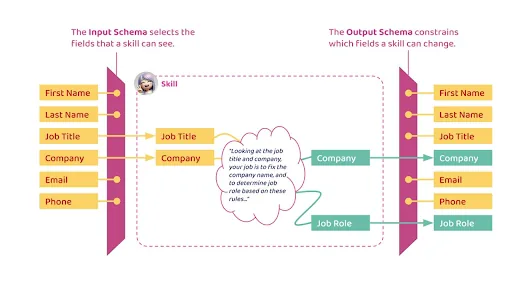
The first governance question is not "what can the agent do?", it is "what can the agent see?" (see this LinkedIn post for more context).
Your marketing systems are full of sensitive context: account notes, lifecycle stages, opportunity data, intent signals, consent fields. An agent helping with campaign creation does not need access to all of it. It needs the right fields for the job.
The broader the input, the bigger the risk of bad recommendations, accidental exposure, or the agent using context it should never have touched. Define an input scope per workflow. Not per agent.
2. What can the agent change?
Next up, let's talk, Ch-ch-ch-ch-changes…. No, sorry, not that one (humans can get distracted too), but ok, I'm back. What record field am I changing in Salesforce and Marketo!!
An agent that drafts email copy is low risk. An agent that updates lifecycle stages or routing logic can break things you'll spend weeks unwinding. Anyone who has worked in Marketing Ops knows how small changes ripple through routing, attribution, and compliance.
The principle here has a name, least privilege, and it is not new. What is new is that the thing doing the changing is autonomous, asynchronous, and can execute thousands of operations without anyone watching. When an agent has permissions that exceed its job, the blast radius of any mistake or compromise goes up dramatically.
Define an output scope too: what the agent can draft, what it can change, what requires human approval.
3. Which tools is the agent allowed to use?
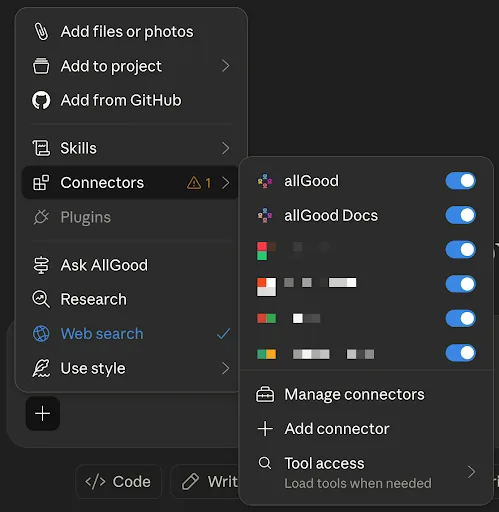
You're about to start a new Claude Chat, did you select the connectors it has access to? I just opened my own, only Ramp was not connected because I had to reconnect it (I'm writing a blog post, did I really need the rest?).
MCP makes it easy for agents to connect to tools. That is the point. But easier connections also mean easier sprawl.
So you connect an agent to Marketo. Another connects one to Salesforce. Someone else adds Google Drive, Slack, Webflow, LinkedIn Ads. Suddenly nobody knows which agents are connected to which systems, what permissions they have, or who approved them. This is what governance folks call Shadow MCP, and it is the agentic version of every shadow-IT story we have all lived through before.
Now, just to be clear, I am not saying you do not run experiments. We published instructions for setting up the Marketo MCP locally in Claude Desktop. That guide is great for evaluating a beta. It is not how you roll this out across a marketing org. Local config files, long-lived API keys, and individual developer setups are an experiment posture, not a production posture.
Production looks different. It is an approved catalog of MCPs and Skills with named owners, scoped permissions, and a review cycle. It looks like OAuth.
Your CIO and CISO know what agents are connected to which systems before something goes wrong, not after.
4. When does a human need to approve the work?
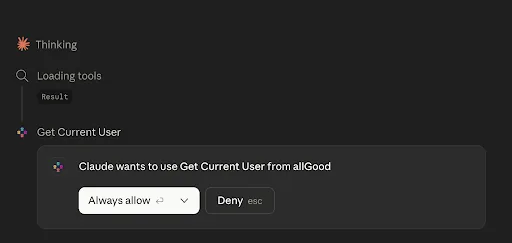
Ok, this is a safe tool to "Always allow", but what about something that changes a field in Salesforce, or launches a campaign? Not every agent action needs the same level of control. The goal of governance is not to put a human in every loop, it's to have the judgement to place these restrictions and controls in the right place.
If the agent is summarizing campaign performance, let it move fast. If it is drafting an email, let it move fast. If it is building a campaign structure, review before activation. If it is changing lifecycle fields, or committing a budget: slow it down.
The industry calls this Human-in-the-Loop, or HITL. Tier your approvals by impact. Read-only and draft work runs autonomously. Anything that touches brand, spend, or live audiences pauses for a human. The cost is a slight feeling of slowness on some actions.
I know my CIO friends are going to be very happy reading this, because what used to be the "IT slows things down" is what your digital worker is complaining about in the GPU farms on break ;)
5. Can you prove what happened?
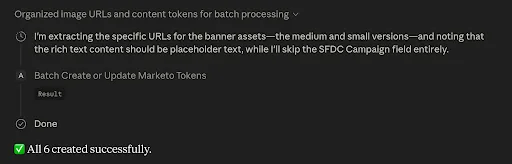
There is the other side of the MCP work: when a user approves it, a change is made to a system you own, and well, this is awesome. You did work without ever touching the UI. But there is a question everyone ignores until something breaks.
A campaign launches to the wrong subject text. A field gets overwritten. Sales asks why leads routed differently this week. Compliance asks who approved the export. The CMO asks what happened.
If an agent was involved, "we think it did X" is not an answer.
You need a record: the prompt, the data the agent accessed, the tool it called, the change it made, the human who approved it (if approval was required).
Oh, and I shared a screenshot from my own Claude Code session. I did not share it with anyone, does it even exist for others? So the key thing to remember is without that trail, you cannot debug if something goes wrong and you can lose trust. And that is not acceptable.
OK, what should I do?
If you're a marketing leader who is looking at this, I am going to give you 4 simple things you can and should start to do today:
Sit down with your CIO and CISO before you scale, not after. Agree on what experimentation looks like, what production looks like, and which workflows cross the line between them.
Kill Shadow MCP before it kills you. Tool sprawl becomes MCP sprawl becomes an agentic mess you cannot untangle in 18 months. Consolidate now. You can and should push for experimentation, but do not go to production without controls in place.
Operate within Human-in-the-Loop by default. No autonomous system should have the authority to commit marketing spend, or publish brand communications, without a human approving it. Make this a policy, not a vibe.
Invest in training and change management. This is new for everyone, including the people writing blog posts about it. Build a culture where someone on your team can say "I am not sure if this is the right way to do this" without losing face.
Freedom in a Box
The line I keep coming back to is this: users must have freedom in a box.
Agents connected through MCP, paired with the right Skills, are going to let marketing teams do things they could not do a year ago. The box is what makes the freedom safe to actually use.
At allGood, we built our own version of this box for allGood, and I am happy to share more of the lessons learnt from that process, so hit me up with questions.